Tuesday, September 23, 2014

ODI XML driver and recursion

The serpent Set swallowing its tail


Most well-designed XSDs avoid recursion. But certain XSDs that are generated by frameworks or by naive Object hierarchy to XML hierarchy conversion tools make heavy use of recursion. In the v2 mode of XML driver this was handled in a spotty manner. Relational structures get created, but data may or may not be populated properly. Some element data may disappear altogether. The v3 mode driver that was introduced in ODI 11.1.1.7.0 and made the default in ODI 12.1.2 uses element xpath to uniquely identify an element. This causes a problem with recursion since each recursion occurrence is a unique xpath and will lead to creation of a new table ad infinitum. This will result in a StackOverflowError. To avoid this, 11.1.7.0 and 12.1.2 XML drivers raise error when recursion is detected.

Breaking the chains


It is obvious that avoiding recursion is not the answer. Hence in ODI 12.1.3 recursion support was added to v3 mode. Broadly speaking there are two types of recursion - self-recursion and multi-element recursion. An example for self-recursion is /CustomerOrder/Order/Order. Multi-element recursion - which is more common - can be exemplified by /CustomerOrders/Order/Return/Order.

XML driver breaks the recursion loop by first detecting the recursion and then identifying the recursion head and recursion tail. For self-recursion, recursion head == recursion tail. In the multi-element recursion above, the recursion head is /CustomerOrders/Order and the recursion tail is /CustomerOrders/Order/Return. Once this information has been identified no further exploration of this hierarchy is performed. /CustomerOrders/Order table will hold the data from all the recursion descendants of 'Order' type and /CustomerOrders/Order/Return table will hold reference to the data for all the recursion descendants of 'Order' type.

So one thing a user may expect with recursion is that even if your XML data has, say 100 levels of recursion, the XML datastores will only have one level representing this whole recursion hierarchy. The driver takes care of folding in and unfolding out the XML data as it is read in or written out. However, if user wants to perform a mapping from or to such a datastore, then they need to make sure that they pay attention to the PK-FKs on the tables so that the mappings to or from different recursion levels do not overlap.  For self-recursion, the ORDER table will have, as usual, an ORDERPK column. In addition it will also have an ORDERFK column. An Order element having an Order child will have the child element's PK reference in the ORDERFK column. In a similar manner, for the multi-element recursion example, RETURN table will have an ORDERFK column that will contain reference to Order children of Return.


Thursday, May 15, 2014

Using ODI to create a Complex File

Reading, writing and .............


It is trivial to configure a Complex File dataserver, reverse engineer it and then read data from the datastores. It is a little cumbersome, but no black magic to do the reverse of it. But there seems to be an impression that there is some arcane process involved in writing out a new Complex File. In this post we shall examine the steps needed to write out some data to a Complex File.

First of all let us configure a Complex File dataserver.


As you may see there is nothing fancy. Just to make things a little more interesting I have added the XML driver property 'ldoc=false' (load on connect = false). This gives me control over when data is actually loaded. Now I test the connection and reverse engineer. This leaves me with the model seen below.

Since I want to explicitly load data into this model I need to create an ODI Procedure. Create a new Procedure and add a Task. All that the Task does is load data from the file that is specified in the JDBC URL into the datastores.


In the above screenshot you can see the configuration of the Task. The Technology is set to 'Complex File', the Logical Schema is set to that of the source dataserver that we have set up. The command to execute is the XML driver's SYNCHRONIZE command.

Only Target Command has content. Source Command section is empty for this Task.

Now we are ready for a target. Use the same XSD as the one for the source dataserver and create a new Complex File dataserver. Be sure to choose a different value for the 's=' property in the JDBC URL of this dataserver. Also see that there is no 'f=' property. We only want the bare datastores for the target. Data in it is going to come from the source.


As before, reverse engineer to create a model and datastores. This will result in a structure equivalent to the one for the first dataserver. Note that we are doing it this way just for our convenience. Nothing stops you from using totally different XSDs for the source and target.

Now comes the part of actually populating the target with data. For this create 4 mappings. Each mapping will take care of moving data from one of the source datastores to the corresponding target datastore. Let us look at the first mapping, an in-between mapping and the last mapping.

First mapping:


As you may see, it is very simple. Just the root element from source is mapped to root element of target. I have chosen to use an Oracle dataserver as my staging area, but this is irrelevant.

The LKM and IKM are the default ones - LKM SQL to SQL (Built-in).GLOBAL and IKM SQL Incremental update - with FLOW_CONTROL and TRUNCATE turned off.

In-between mapping:


This is the mapping between CUSTOMERCHOICE datastores of source and target. Again staging area is the Oracle dataserver. KMs are as for the ones in the first mapping.

Last mapping:


The last mapping is the one with ITEMCHOICE.

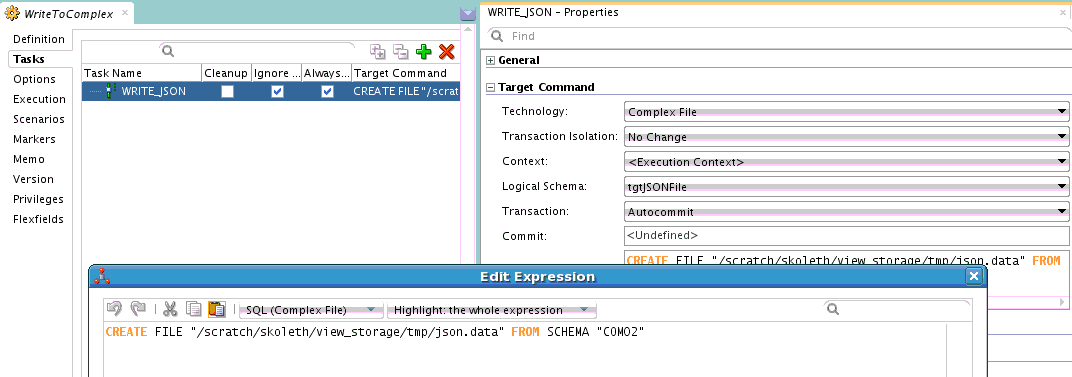
Now we have moved data from source datastores into target datastores. What we need to do next is to push this data out into a complex file. In order to do this we need another ODI Procedure. This time the Procedure Task will use XML driver's CREATE FILE command.

Here is the Procedure Task. As before the Technology is set to 'Complex File' and Logical Schema is set to the target dataserver's logical schema. The command is 'CREATE FILE FROM SCHEMA "COM02" where 'COM02' is the value of the 's=' property set on the JDBC URL of the target dataserver.

Next step is to assemble all these Mappings and Procedures into a control flow. For this we use an ODI Package.

Execute this Package and you will see the data that you loaded into the target datastores written out into a complex file that follows the structure that is defined by the XSD associated with the target dataserver. That is it.

What if .....

One error you might encounter when trying to write out the data is 'Start of root element expected'. This error means that the XML data being written out does not conform to the XSD file that you have used for configuring the Complex File data server. There is no easy way to debug this. But here is something you can try.

Use the XSD file that has been used in the Complex File dataserver to set up an XML dataserver. Create exactly same Interfaces/Mappings and Procedure as you have used for the Complex File creation, but this time using the XML datastores as the targets. Now write out the data and examine it. If the problem is in the root element you can spot it immediately. Otherwise you can use the Native File Format command line to test the generated XML against the XSD. Follow the instructions in this blog post.

Thursday, April 24, 2014

ODI JMS driver IKMs in 12c

IKM...LKM...knowledge!


ODI has the concept of knowledge modules that encapsulate and re-use the heavy lifting logic required for data movement. There are several KMs authored targeting different data sources. A big shift occurred in the world of ODI data flow control by the introduction of flow-based mapping in 12c. This component obviated many of the limitations imposed by ODI Interfaces in pre-12c days. 12c also introduced the concept of component KMs and global KMs. When desinging a mapping, most of the time an appropriate component KM gets chosen by default - whether it be for loading or integration.

JMS....JMS..wherefore art thou JMS


A pretty significant gotcha crept in for the particular case of JMS or JMS XML as target. If you design a mapping with a datastore from these technology types as target then you know that for the data to be actually sent to the JMS Queue/Topic you need to choose the JMS-specific IKM. Here lies the catch. Although you may have imported the IKM into your project when you go to the target datastore configuration to set the IKM you may not find it there. If this happens to you check the LKM that is being used. The JMS-specific IKMs are designated as multi-connect KMs and in ODI 12c if you want to use a multi-connect IKM then your LKM must also be multi-connect.
So the solution is to switch your LKM to one of the multi-connect component KMs or template KMs.

If you see similar symptoms with other KM combinations remember this : check your KM to see if they are multi-connect.

Tuesday, December 17, 2013

ODI 12c debugger : row-by-row debugging

ODI is a set-based data processing tool. It does not automatically switch to a row-by-row mode for debugging. But what you *can* do is to use the IKM SQL Incremental Update. This will cause the engine to do row-by-row processing and voila! you can do row-by-row debugging.

Wednesday, December 4, 2013

ODI debugger - Part 2

Descendant Sessions debugging

In ODI one Session can launch a child Session in different ways.
  1. user can have an OdiStartScen tool invocation either in Package or Procedure
  2. user can have an OdiInvokeWebService invocation either via Package or Procedure
  3. user can have an OSCommand or OdiOSCommand tool invocation calling startscen.sh/cmd or restartsess.sh/cmd either in Package or Procedure
ODI debugger will notify the client about debuggable child Sessions start only in case (1). In this case you need to be aware of one fact. Child Sessions inherit debug flags set on the parent Session unless they are explicitly overridden by debugger properties set on OdiStartScen. So if parent Session has the flags DEBUGGABLE=true and DEBUG_DESCENDANT_SESSIONS=true set, then any child Session would be automatically debuggable and *its* children would be debuggable and would start any of their child Sessions also in debuggable mode. This gives the user a very flexible debug configuration. User may want to launch the root Session in non-debuggable mode, but have a specific child Session debuggable. Or they might want it the other way, some children to be debuggable while others are not.

There is another subtle gotcha. When ODI Studio notifies you that a child Session is starting, if user chooses not to attach Studio to that debuggable Session, then user *will not receive any notifications for any debuggable child Sessions started by this child Session*

Starting Session in debug mode


All the ways for starting a Session have debugger flags that user may set. This includes startscen.sh/cmd, restartsess.sh/cmd, ODI incoming web service (a.k.a public web service), OdiStartScen tool, SDK APIs and Studio.

Thursday, October 17, 2013

ODI 12c debugger

Debugging ODI is hard

Why is it so hard? Well, the following are a few reasons. ODI has tools such as OdiStartScen that will let an ODI Session launch another ODI Session on a wholly different agent. ODI interfaces (mappings in 12c) can use DB-native utilities for pumping data. This means that ODI does not have a view into the data being transferred. In ODI 12c we have introduced multi-threading in ODI Tasks. This means that like ODI Loadplans, ODI Tasks can be run in serial or parallel mode.

What have we done then?

While designing and implementing the debugger was a blast, it was disheartening to succumb to some limitations. However there are not that many of them. Just to bring it up in front, ODI debugger will let you suspend the execution flow before/after an ODI Step or before/after an ODI Task. Breakpoints can be set on design-time artifacts like Package or Procedure or on runtime artifact - ODI Blueprint.

Know your Sessions

The problem of distributed debugging is solved for the client by ODI detecting a new Session launch that is associated with a parent Session and making the client aware of the same. A caveat here is that the client must be actively debugging the parent Session. Otherwise there is no place for us to send the notification. So the good thing is that the client gets a transparent debugging experience. Don't worry, client has the option to not connect to the child Session. There are options so that even upfront you can say that the child Session is not candidate for debugging. In this case child Session is allowed run on and client cannot debug it.

See my data before or after

Data debugging is  only allowed at the beginning and ending of an ODI Task. The fact that was mentioned earlier viz. ODI may use native utilities to pump data in either direction prevents ODI from providing a transfer-by-transfer data debugging facility. However, for most usecases, the current data debugging facility will be more than sufficient, since at the end of the ODI Task we will be letting the client see uncommitted data. Note that this is a view-only tool. No modification of data is allowed. You may think of this as a limitation, but there is a way around it. ODI Debugger allows JIT modification of code. For example, if you suspend execution before an ODI Task and then modify the code of the Task, you can push that code to the repository. So when ODI gets to the point of actually executing that Task it is your modified code that will get executed. How can this help you? Well, sprinkle some dummy ODI Tasks in your ODI flow. Then when and if you see problems with your data and the next Task is a dummy Task, pause at the beginning of the Task and insert code to modify your data.

ODI threads not Java threads

ODI debugger also transparently takes care of multi-threaded tasks for the client. It provides you with a view of the threads of execution that are tied to the current ODI Session. You can see the execution stack of each of these threads and also open the Session viewer to see the precise point at which the execution has been paused. Right now, if there are multiple threads of execution in a Session and more than one of threads has been paused it is a bit difficult to make out from the Session editor's Blueprint tab as to which suspend point belongs to which thread, but it is a minor point.

See your variables' state

You will also be glad to see a variables view. Historically ODI variables have had a lot of bugs associated with it - be it actual bugs or user perception problem. The debugger can help here to a large extent in that it lets you see the ODI Variables and updates the displayed values as and when they change. Not only that the debugger will even let you dynamically modify the value of the Variable. That should be a pretty powerful tool.

So there you have it - a feature-rich debugger for ODI that should help customers and DW developers immensely.

Wednesday, October 9, 2013

ODI JMS (XML) data server peculiarities

ODI JMS data servers

ODI has JMS Queue, JMS Topic, JMS XML Queue and JMS XML Topic drivers. The Queue/Topic drivers are slightly different from XML Queue/Topic drivers. Of course the obvious difference is that the former is for Delimited/Fixed width message types and the latter is for XML message types. In addition to this there is one more subtle difference.

Go on and create a new JMS Queue data server. Give it some name and then switch to the JNDI tab. You will see drop-down for authentication type, text fields for user name and password, drop-down for JNDI protocol, text fields for JNDI Driver (the fully qualified name of the InitialContextFactory class for your JNDI server), JNDI URL and JNDI Resource.

Gotcha 101

 Many people mistakenly think that JNDI Resource is where you put the JNDI name of your Queue/Topic. This is wrong. This field is for entering the JNDI name of your JMS connection factory. It can be a custom connection factory created on the JMS server by you or an in-built one for the JMS server. If you are using Weblogic you will have the following connection factories available without any configuration : javax.jms.QueueConnectionFactory, javax.jms.TopicConnectionFactory, weblogic.jms.ConnectionFactor and weblogic.jms.XAConnectionFactory. This concludes all the configuration you can do the data server.

Gotcha 102

Did you notice anything funny? Even on the Physical or Logical schema you have no place to provide the name of JMS Queue/Topic. For this you actually have to jump through another hoop. It will be explained below. But first think about the impact of this limited configuration. You have provided JNDI URL to your JNDI server, credentials, authentication mechanism and connection factory, but no Queue/Topic information. This means that when you press that nice helpful 'Test connection' button all it is testing is creation of the InitialContext object. It does not test actual connectivity to the Queue/Topic.

Now let us say you want to connect to your Queue. Create a Model baased on the Logical Schema of your JMS Queue data server. Again, you cannot reverse engineer a JMS Queue/Topic. So you have two options :
  1. create a Datastore under this model and define the column structure by hand or
  2. make a copy of a Delimited/Fixed width File Datastore
 After the Datastore has been created there is one more thing to do : there is a text field on the Definition tab of the Datastore named 'Resource name'. For a File Datastore this would point to the actual file. This is where you enter the JNDI name of your JMS Queue/Topic.

Phew! That was a tortuous setup.

What about JMS XML Queue/Topic? Now that has some differences. For example the JNDI URL takes a key-value pair where the key is JMS_DESTINATION and the value is the JNDI name of your Queue/Topic. So all the JMS configuration is in one place. Also, a JMS XML Model can be reverse engineered.
You may now be saying to yourself 'All right!!!!!! Let me make all my JMS Queue/Topics XML-based messages'. Hold your horses, because there is a down side : you cannot right-click a JMS XML Queue/Topic Datastore and do 'Data' or 'View data'. It is not supported.

So there you are. A little the worse for wear owing to this trip over ODI JMS. Wait for the next few blog posts that will reveal to you some more hidden pitfalls and capabilities.